Google Pixel 3
Overview
| codename blueline | 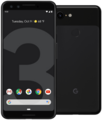 ⚙️
⚙️ |
🛡️ |
| Flavor (?): | Pro | Slim |
|---|---|---|
| Android: | 15 | 15 |
| First released: | WIP | TBD |
| Firmware: | included | included |
| Encryption (?): | ICE | ICE |
| Relockable: | yes | yes |
| VerifiedBoot/AVB (?): | v2.0 | v2.0 |
| Patchlevel (?): | Platform + Kernel | Platform + Kernel |
| Verified & tested by: | The AXP.OS community | The AXP.OS community |
| State: | !! ALPHA !! | !! ALPHA !! |
Installation guide
You want to switch between flavors or coming from DivestOS?
Please read this first: All about AXP.OS flavors If you miss a flavor you can request it here.
Known issues
- AXP.OS - Known Issues
- Issue tracker - won’t fix
Specific for your device:
- Issue tracker: blueline
Boot modes
Each device has its own method to access special boot modes.
See: blueline (@LineageOS wiki)
Firmware
AXP.OS for the Google Pixel 3 includes the appropriate bootloader and modem firmware for the corresponding Android version provided.
Important
Unfortunately, some manufacturers enable so-called “Anti-Rollback Protection” (ARB), which in the worst-case scenario can even take effect within the bootloader (notable examples include various LG models, as well as Samsung and even some Google Pixel devices).
In these cases, special caution must be exercised, as this can often result in a hard brick, which may be unreparable depending on the manufacturer and model. This is not a problem with AXP.OS itself, but affects all custom OSes for such devices.
If you are unsure, please check with the support room before flashing AXP.OS.
Install / Upgrade
Setup AXP.OS
Follow Setup
Re-locking the bootloader
Follow Bootloader-Lock
Fingerprint information
On boot you may see a fingerprint/ID verifying AVB trust.
Some devices show only 8 chars, others full digest.
See more details here.
This fingerprint is unique per device and flavor.
If you see a different ID, immediately request support.
Pro build
BOOTLOADER minimal ID (AVB 2)
    D0AD4BDE

BOOTLOADER full ID:
    D0AD4BDE794F5D82
    AABC3AA34C5450B9
    25E3B1F3025AFA4A
    CA5045A30B1C8338
Slim build
No fingerprint information available. Contact support.
XDA thread
See here
Debugging
DEVICE-BOOT-DEBUG-PATH: /metadata
See Logs
Download
All downloads have a GPG signed sha512sum file which should be used to verify the download & file integrity.Details how to make use out of it can be found here.
💡 The hashsum of new builds are also send in the sfX Automation channel. This gives you a second and independent option for comparison if the download server is compromised.
| Flavor (what's this?) | OS zip | Recovery image | FACTORY zip | AVB key (what's this?) | Release key (what's this?) |
|---|---|---|---|---|---|
| Pro ⚙️ | |||||
click here for info | |||||
| Slim 🛡️ | |||||
click here for info |